Monday, 24 February 2014


Sunday, 23 February 2014

Friday, 21 February 2014

Program to Create this Image In Graphics
#include<GL/gl.h>
#include<GL/glut.h>
#include<Math.h>
void disp( )
{
glClearColor(1.0,1.0,1.0,0.0);
glClear(GL_COLOR_BUFFER_BIT);
glLineWidth(2);
int num_segments=90;
int i;
float cx=0.0,cy=0.6, r=0.10;
glColor3f(1.0,0.0,0.0);
glBegin(GL_POLYGON);
for(i=0;i<num_segments;i++)
{
float theta;
theta=(2.0*3.1415962*(i))/(num_segments);
float x=r*cosf(theta);
float y=r*sinf(theta);
glVertex2f(x+cx,y+cy);
}
glEnd();
glColor3f(1.0,0.0,1.0);
glBegin(GL_QUADS);
glVertex2f(0.2,0.2);
glVertex2f(0.2,-0.2);
glVertex2f(-0.2,-0.2);
glVertex2f(-0.2,0.2);
glEnd();
float cx1=0.6,cy1=0.0;
glColor3f(0.0,1.0,0.0);
glBegin(GL_POLYGON);
for(i=0;i<num_segments;i++)
{
float theta;
theta=(2.0*3.1415962*(i))/(num_segments);
float x=r*cosf(theta);
float y=r*sinf(theta);
glVertex2f(x+cx1,y+cy1);
}
glEnd();
float cx2=0.0,cy2=-0.6;
glColor3f(0.0,0.0,1.0);
glBegin(GL_POLYGON);
for(i=0;i<num_segments;i++)
{
float theta;
theta=(2.0*3.1415962*(i))/(num_segments);
float x=r*cosf(theta);
float y=r*sinf(theta);
glVertex2f(x+cx2,y+cy2);
}
glEnd();
float cx4=-0.6,cy4=0.0;
glColor3f(0.0,0.0,0.0);
glBegin(GL_POLYGON);
for(i=0;i<num_segments;i++)
{
float theta;
theta=(2.0*3.1415962*(i))/(num_segments);
float x=r*cosf(theta);
float y=r*sinf(theta);
glVertex2f(x+cx4,y+cy4);
}
glEnd();
glColor3f(0.0,0.0,1.0);
glBegin(GL_TRIANGLES);
glVertex2f(-0.2,0.2);
glVertex2f(0.0,0.5);
glVertex2f(0.2,0.2);
glEnd();
glColor3f(1.0,1.0,0.0);
glBegin(GL_TRIANGLES);
glVertex2f(0.2,0.2);
glVertex2f(0.5,0.0);
glVertex2f(0.2,-0.2);
glEnd();
glColor3f(0.0,1.0,0.0);
glBegin(GL_TRIANGLES);
glVertex2f(0.2,-0.2);
glVertex2f(0.0,-0.5);
glVertex2f(-0.2,-0.2);
glEnd();
glColor3f(0.0,1.0,3.0);
glBegin(GL_TRIANGLES);
glVertex2f(-0.2,-0.2);
glVertex2f(-0.5,0.0);
glVertex2f(-0.2,0.2);
glEnd();
glFlush();
}
int main(int argc, char** argv)
{
glutInit(&argc, argv);
glutInitDisplayMode (GLUT_SINGLE | GLUT_RGB);
glutInitWindowSize(800,500);
glutInitWindowPosition(150,150);
glutCreateWindow ("Evaluation");
glutDisplayFunc(disp);
glutMainLoop();
return 0;
}
Thursday, 20 February 2014

Sunday, 16 February 2014
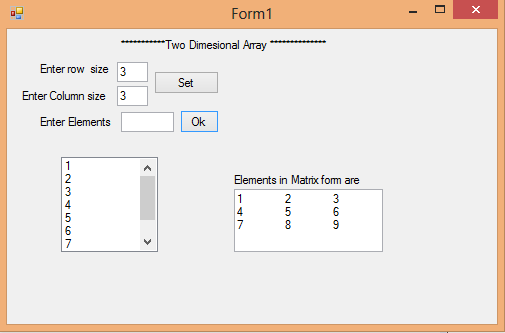
Program to store Elements in 2-D Array Using Window Form and print elements in tabular form or matrix form..
using System;
using System.Collections.Generic;
using System.ComponentModel;
using System.Data;
using System.Drawing;
using System.Linq;
using System.Text;
using System.Threading.Tasks;
using System.Windows.Forms;
namespace Two_D_Array
{
public partial class Form1 : Form
{
int row, col;
int i=0, j=0;
int[,] a;
public Form1()
{
InitializeComponent();
}
private void button1_Click(object sender, EventArgs e)
{
row = Convert.ToInt32(textBox1.Text);
col = Convert.ToInt32(textBox2.Text);
a= new int[row,col];
}
private void textBox2_TextChanged(object sender, EventArgs e)
{
}
private void button2_Click(object sender, EventArgs e)
{
//i=0;j=0;
if(i<row)
{
if(j<col)
{
a[i, j] = Convert.ToInt32(textBox3.Text);
textBox3.Text = "";
listBox1.Items.Add(a[i, j]);
textBox4.Text += a[i, j].ToString() + "\t";
j++;
}
else
{
i++;
j = 0;
textBox4.Text += "\n";
}
}
}
}
}
using System;
using System.Collections.Generic;
using System.ComponentModel;
using System.Data;
using System.Drawing;
using System.Linq;
using System.Text;
using System.Threading.Tasks;
using System.Windows.Forms;
namespace Two_D_Array
{
public partial class Form1 : Form
{
int row, col;
int i=0, j=0;
int[,] a;
public Form1()
{
InitializeComponent();
}
private void button1_Click(object sender, EventArgs e)
{
row = Convert.ToInt32(textBox1.Text);
col = Convert.ToInt32(textBox2.Text);
a= new int[row,col];
}
private void textBox2_TextChanged(object sender, EventArgs e)
{
}
private void button2_Click(object sender, EventArgs e)
{
//i=0;j=0;
if(i<row)
{
if(j<col)
{
a[i, j] = Convert.ToInt32(textBox3.Text);
textBox3.Text = "";
listBox1.Items.Add(a[i, j]);
textBox4.Text += a[i, j].ToString() + "\t";
j++;
}
else
{
i++;
j = 0;
textBox4.Text += "\n";
}
}
}
}
}
Saturday, 15 February 2014
Sony VAIO Tap 20
Sony deserves credit for establishing the portable all-in-one market, having introduced the VAIO Tap 20 last winter. This model boasts a Core i7 CPU, 8GB of memory, and a 20-inch ten-point touchscreen for just $1100. On the downside, its display resolution is disappointingly limited to 1600
by 900 pixels.

by 900 pixels.
Moving the Tap 20 from room to room is an even more awkward task due to its 11-plus-pound bulk—this computer is almost twice as thick as Dell’s XPS 18 Touch. I was also surprised by the Tap 20’s relatively poor battery life: It played our HD video for just 2 hours, 21 minutes before it pooped out.
When Loyd Case reviewed the VAIO Tap 20 back in October 2012, nothing comparable was on the market. So even though the model he tested had a Core i5-3317U processor and only 4GB of memory, he awarded four stars to the new and innovative (for its time) concept. The competition has responded aggressively since then, and the Tap 20 has lost some of its luster. Fortunately, Sony has adjusted its pricing accordingly, and the current street price of $1100 renders this machine a good value.
Pros:
Intel Core i7 CPU
1TB hard drive
Sony's Bravia video technology
Cons:
Thick and heavy for its size
Short battery life
5400 rpm hard drive
Bottom line:
Sony essentially created this market, which means the Tap 20 has been around for a while. This computer is thicker and heavier than it should be, but Sony has priced it aggressively.
Wednesday, 12 February 2014
Subscribe to:
Posts (Atom)